9/29/08

List Services to ping

Ping services allow you to automatically notify blog directories and search engines that your blog has been updated. The bigger your ping list the higher the chances of receiving traffic from those sources, so check out the list below and include it on your blog (Wordpress users can modify their ping list on the Control Panel, then Options, then Writing).

General Ping Services (62):

http://1470.net/api/ping
http://api.feedster.com/ping
http://api.moreover.com/ping
http://api.moreover.com/RPC2
http://api.my.yahoo.com/RPC2
http://api.my.yahoo.com/rss/ping
http://bblog.com/ping.php
http://bitacoras.net/ping
http://blog.goo.ne.jp/XMLRPC
http://blogbot.dk/io/xml-rpc.php
http://blogdb.jp/xmlrpc
http://blogmatcher.com/u.php
http://blogsearch.google.com/ping/RPC2
http://bulkfeeds.net/rpc
http://coreblog.org/ping/
http://effbot.org/rpc/ping.cgi
http://mod-pubsub.org/kn_apps/blogchatt
http://ping.amagle.com/
http://ping.bitacoras.com
http://ping.blo.gs/
http://ping.bloggers.jp/rpc/
http://ping.blogmura.jp/rpc/
http://ping.cocolog-nifty.com/xmlrpc
http://ping.exblog.jp/xmlrpc
http://ping.feedburner.com
http://ping.myblog.jp
http://ping.rootblog.com/rpc.php
http://ping.syndic8.com/xmlrpc.php
http://ping.weblogalot.com/rpc.php
http://ping.weblogs.se/
http://pingoat.com/goat/RPC2
http://rcs.datashed.net/RPC2/
http://rpc.blogbuzzmachine.com/RPC2
http://rpc.blogrolling.com/pinger/
http://rpc.icerocket.com:10080/
http://rpc.newsgator.com/
http://rpc.pingomatic.com
http://rpc.technorati.com/rpc/ping
http://rpc.weblogs.com/RPC2
http://thingamablog.sourceforge.net/ping.php
http://topicexchange.com/RPC2
http://trackback.bakeinu.jp/bakeping.php
http://www.a2b.cc/setloc/bp.a2b
http://www.bitacoles.net/ping.php
http://www.blogdigger.com/RPC2
http://www.blogoole.com/ping/
http://www.blogoon.net/ping/
http://www.blogpeople.net/servlet/weblogUpdates
http://www.blogroots.com/tb_populi.blog?id=1
http://www.blogshares.com/rpc.php
http://www.blogsnow.com/ping
http://www.blogstreet.com/xrbin/xmlrpc.cgi
http://www.catapings.com/ping.php
http://www.lasermemory.com/lsrpc/
http://www.mod-pubsub.org/kn_apps/blogchatter/ping.php
http://www.newsisfree.com/RPCCloud
http://www.newsisfree.com/xmlrpctest.php
http://www.popdex.com/addsite.php
http://www.snipsnap.org/RPC2
http://www.weblogues.com/RPC/
http://xmlrpc.blogg.de
http://xping.pubsub.com/ping/

9/28/08

Sitemaps - How to submit sitemaps to MSN, Yahoo, and Google

Need to know how to submit a sitemap to MSN, Yahoo, and Google. Just replace the [sitemap URL] with your URL to your sitemap.

MSN
http://webmaster.live.com/webmaster/ping.aspx?siteMap=[sitemap URL]

Google
http://www.google.com/webmasters/sitemaps/ping?sitemap=[sitemap URL]

Yahoo
http://search.yahooapis.com/SiteExplorerService/V1/updateNotification
?appid=YahooDemo&url=[sitemap URL]

There are other ways…I will add more information as time allows.

9/27/08

Easy High-PR Backlink Method

You need traffic to make any real money as an AdSense publisher. Search engines are a great source of free traffic, but these days you need a lot of links back to your pages in order to rank well. Here’s one easy and free way to legitimately get high-PR backlinks. It requires some time and some elbow grease, but it’s worth exploring.

Step 1: Install the SEO For Firefox Add-On

You need to be using the Firefox browser. Install Aaron Wall’s free SEO For Firefox add-on. This extension modifies search engine results pages on the fly to show all kinds of interesting data about the results, including (tada!) Google PageRank (PR). After installation, restart the browser, go to the Add-ons section, select the options button for the add-on and make sure that the PageRank option is selected.

Step 2: Find a “Do Follow” Blog or Social Site

This requires some research, but you only have to do it once. Gather a list of on-topic blogs and social sites that don’t use “nofollow” on user-submitted external links. A good place to start is with the Do Follow Blogs Directory.

Some of the “do follow” sites may surprise you. Digg is “do follow”, for example.

Step 3: Search for High-PR Posts/Entries

For each blog/site in your “do follow” list, search for posts/entries that have PageRank assigned and meet a minimum PR level. It’s very easy to do. First, go to Google and use the site: command to restrict a search to pages from a given site. Then add in your keyword/phrase to find relevant pages on that site.

This is how I find promising pages about AdSense on Digg:

site:digg.com adsense

Pretty easy! All you do is (with the SEO For Firefox toolbar enabled) scan down the list of results and look for pages that have a PR value assigned. Many of them will have no PR assigned (new pages don’t)… it’s hard to find high PR ones, but I’ve definitely come across several PR 5 or 6 pages in my searches.

Step 4: Leave a Comment

Once you’ve found a promising page, see if you can come up with a relevant comment. In the comment, link back to your site somehow. You may not be able to leave a normal link. Digg, for example, only allows you to enter a URL. (This is where having the keywords in the URL will help, of course.) Do what you can.

Be sure not to spam. Only comment on relevant pages and make sure your comment actually adds to the discussion.

Step 5: Rinse and Repeat

That’s it… do this as many times as you can stand it, on as many sites as possible. It takes time, and it takes effort, but it can yield long-term benefits for your own pages.

Some people will charge you $10 for this information, I’ve given it to you for free. Have fun!

source

How To Squeeze Out More Keywords From The AdWords Keyword Tool

A very short tip about the AdWords keyword tool — which is free to use, as I keep mentioning, no AdWords account needed. (If you do have an AdWords account, though, might as well log into the account and use it from there, you won’t have to prove you’re human.)

Normally, the AdWords keyword tool gives you at most 200 keyword ideas. What most people don’t know is that the list of keywords can vary on each request. So by running the tool multiple times on the same keyword you can generate a slightly larger set of keywords.

Here are the steps:

  1. Search for a keyword (or analyze a site)
  2. Scroll through the results and click all the Add all links so all the keywords end up in the list on the righthand side of the browser window
  3. Go back to the top and hit the Get keyword ideas button again.
  4. Scroll through the results. Any new keywords not already in the list will be obvious, since they’re in blue and the other ones are in grey.
  5. Repeat this process until you don’t get any more keywords. Try checking or unchecking the Use synonyms option while doing this to get even more keywords.

The only downside with this approach is that when you move the keywords over into the righthand side you lose all the search and competition data. If you plan on analyzing the data, you’ll want to download the spreadsheet format for the keyword data after each press of the Get keyword ideas. You’ll then have to merge the data into one big spreadsheet.

AdSense and Google Knol

I’ve been playing around with Google Knol a bit over the past few days, just getting a lay of the land and such. Knol is kind of a cross between Squidoo and Wikipedia, letting users submit articles on pretty much any topic that others can edit and/or comment on (if the authors allow it).

My first impression of the Knol homepage was “uh oh, spam city” because of the topics of the featured articles: cancer, diabetes, and other ailments. Typical fare for a low-quality info site, in other words. But a closer look showed that the articles were actually high quality, written by medical specialists. And there were no ads on those articles, so money wasn’t the motivation for writing them. (Well, maybe Google paid them… but they weren’t MFA articles.) It sounds like Google rounded up some people beforehand to write quality articles for the site.

Still, this is an AdSense blog, so let’s get to the topic everyone’s interested in…. How do you make money with Knol? The obvious answer is through its integration with your AdSense account.

When you register with Knol, you have the option of associating your AdSense account with your user profile. You must do this explicitly, even if your login is the same as your AdSense account login, and you’ll get an email from Google asking you to OK the association. Once you do that, your AdSense info is passed to Knol. There’s some kind of review that happens at this stage, which may take up to 2 weeks to happen. If you’re approved (I wonder if they’re looking to keep out obvious spammers) then AdSense ads will appear on any knols you author and the clicks will go straight to your AdSense account.

Knol has an unfair advantage over other revenue-sharing info sites. Unlike those sites, you don’t have to share your AdSense revenue with Google, since of course they already make money from every AdSense click no matter where it happens. Presumably this is going to make Knol more appealing than Squidoo and other place that take a cut of the AdSense revenue to support their business model.

Expect to see spam show up on Knol, of course. I know of at least one person who’s released a tool to automatically submit articles to Knol. All links on Knol are “nofollow”, however, so from an SEO perspective getting links from Knol to your sites won’t do you much good… but they may still be good for traffic. And then there’s the revenue-sharing…. there’s definitely some appeal there for the shadier types.

What I’m really interested in seeing is if Knol pages get high rankings in search engine results the same way that Google favors Wikipedia pages. Given that everyone’s talking about Knol, presumably there will be a large number of natural links pointing to the Knol site to give it good PageRank. Will that be enough to overtake Wikipedia in the long term? Guess we’ll have to wait and see….

source

How to Find Your Site’s Position in Google Search Results

Some readers asked me how I could tell where my site ranked for a given keyword. It’s actually very easy to do with the right tools. There are two ways.

The first is to use my free Rank Checker tool. It’s a desktop application where you feed it a bunch of URLs and a bunch of keywords and it tells you which URLs rank for which keywords. I released it as a “mystery tool”, and I might still charge for it, so get it now while it’s free…

Anyhow, the other way to do it involves these steps:

  • Start a copy of Firefox.
  • If you haven’t already, install the SEO Tools for Firefox add-in. (You’ll have to restart Firefox.)
  • Go to the Google home page and click the Preferences link. Set the preferences to display 100 results per page and save the preferences.
  • Make sure the SEO Tools plugin is enabled — the “SEO” icon in the bottom right of the status bar should be in color.
  • Search Google for the keyword/phrase of interest. You’ll see a bunch of extra information at the bottom of each item in the Google results page. These are inserted automatically by the SEO Tools extension. Right now you’re mainly interested in the position, i.e. “#1″, “#2″, etc.
  • Hit CTRL+F to bring up the Firefox search box. Type in the start of the URL you’re interested in tracking. (If I want to see what position this blog is in, I just look for memwg.com.) After typing in the URL (or partial URL), click the “Next” button immediately to the right of the search bar.
  • If your URL is in the results, you’ll jump immediately to it and see what position you’re at.
  • If not, go to the next page of the results and click the Next button again. Repeat this process as many times as necessary until you either find your site or run out of results.

The key is the 100 results per page setting — it makes the process much less tedious.

Don’t forget that the results you see are dependent on which Google site you’re using, what language you’re targeting, etc.

source

9/25/08

Get In The Google Top 10 - Post Title Optimization

Google TopPost Title Optimization is one of the most important things you need to do for getting good or great results in the SERPs. When you know how to choose a title for your post than you can get a lot of traffic from the search engines!

Optimizing Post Title Includes:

1. Choosing your title carefully - it means that you use the title that is most likely to be used for a given term
2. Use the term in your post - mention the term on the beginning of the post and in the end of your post.
3. Comment and mention the term - Respond to someone's comment and mention the term in the comment
Recently I have done a little research on how to get in the Google Top 10 for several search terms and I've been more than successful.

Here's an example: I wanted to rank in the Google's top 10 search results for the term "add categories to blogger" which is a very often used term in the search engines. The term specified shows up 22.200.000 on search results and it's not that easy to get in the first 10 pages of the search, not to say in the top 10!

But, by carefully choosing the post title for my post and doing some post title optimization I got into top 5 of the search results for that term! Try typing in the term "add categories to blogger" or "adding categories to blogger" or even "adding categories to blogspot" and you'll see my blog showing up in the 5th place!

Post Title Optimization


So, by optimizing your post title you can go direct in the Google's top 10 search results for a given term.

9/24/08

Seo Guides - Choosing The Keywords

Seo Guides - Choosing The Keywords

Choosing The Keywords Your Website Should Target

Choosing which keywords your website should target is perhaps the most important decision you can make when beginning search engine optimization.The aim of keyword research is to discover which words and phrases will not only bring traffic to your website, but more importantly, bring targeted traffic to your site. Targeted traffic is the traffic that will generate most sales as the searchers will actually get what they are looking for when they enter your website.
Before you use the first keyword that pops into your head it’s wise to first do some research, firstly to find out how difficult it will be to get a good ranking for your chosen keywords and also the number of people that enter those keywords into the search engines, which will give you some idea on the amount of traffic you can expect.

Research Your Keyword

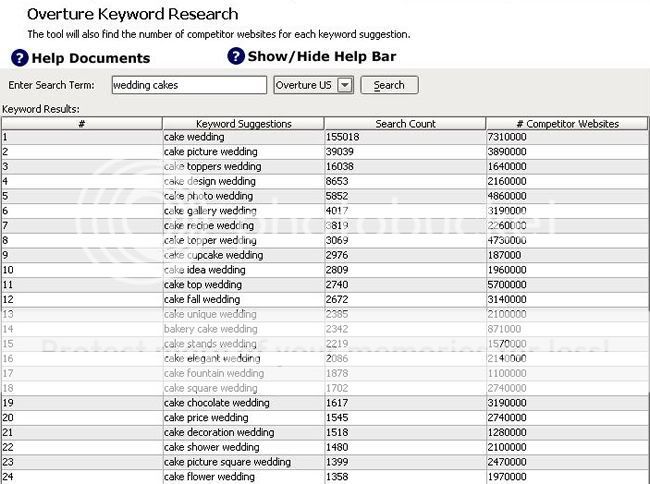
In order to research your keywords you can use WebLink SEO's Overture Keyword Research tool. The keyword research tool enables you to enter a word or phrase and view other similar words/phrases that people have search for, and also how many competitor websites there are for each keyword suggestion. This enables you to search for niche keywords that do not have high levels of competition while also generating targeted traffic to your website.
For example, lets pretend you operate a website that sells wedding cakes. We can see from the Overture Keyword Research tool that the number of people who typed “wedding cakes” into Overture was 155,018 for the previous month.


However, let’s assume the product or service your website offers is not available to a global audience, but rather you want to target a local audience. There’s little point targeting the phrase “wedding cakes” as the majority of people that come to your site won’t be able to buy any wedding cakes as they might not be in the same country as the shop itself! You might get a large amount of traffic to your site, but it’s unlikely you will get good conversion rates, and also the additional time you spent optimizing for this popular phrase could be wasted. Instead you should try to get ‘Targeted Traffic’. This is where you get traffic to your site that is most likely to lead to a sale.
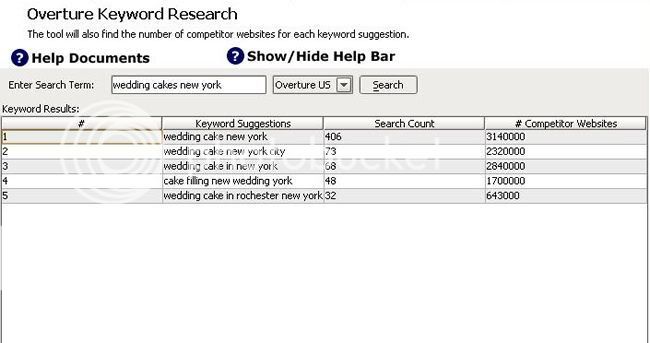
So let’s say our wedding shop is in New York. Rather than targeting the keyword “wedding cakes” you should target “wedding cakes new york”.

If we now look at the overture keyword tool again, we can see that the number of people that type “wedding cakes new york” was less than the number that typed “wedding cakes”, but because we've targeted a more specific phrase, the visitors you do get will be more likely to lead to a sale. It will also be much easier to get a high ranking in the search engines for the term “wedding cakes new york” as there is less competition for that particular phrase.

Analyzing The Competition

So, we now have an idea of what phrase we want to target, let’s look at how difficult it will be to get on the first page in Google for that phrase.
At this stage I want to introduce a new concept – Google PageRank. The way Google (and other search engines) decide which order websites appear in its results is to look at how many websites provide links to a certain website. The more links a website has, the more popular it is deemed to be, and the better the position in the search engine it will receive. This is currently the major factor that determines what position a website will appear in the search engine results. There are other factors (which I will cover in later guides), but this is fundamentally the main factor that the search engines use.
Google PageRank offers a measure of how many incoming links (or backlinks as they’re known) a website has. The PageRank itself is an exponential scale between 0-10, the higher the PageRank of a website, the more links it has coming into the website.
If I use the Search Engine tool in WebLink SEO we can see the Google PageRank for the top 10 results for the term “wedding cake new york”.


I can see that my website would need a PR of at least 4 to stand any chance of getting in the top 10 results. So how many incoming links to my site would I need to get a PR4? Here is a chart that approximately shows how many links are needed to achieve a certain PR from pages with a particular PR.


From the chart you can see for example that if you want to achieve a PR of 5 you need 18 PR5 pages linking to you, 3 PR6's or just one PR7. This of course is just an approximation. If the page has 30 links instead of 50, more PR would be passed and less links are needed to achieve the same PR.
I hope this guide has helped you get started with optimizing your website, and introduced the basics of search engine optimization. In the following guides I will walk you through the process of optimizing your website for the target keyword, and the different methods that can be used to get links from other websites.